Motion that knows when to step back.
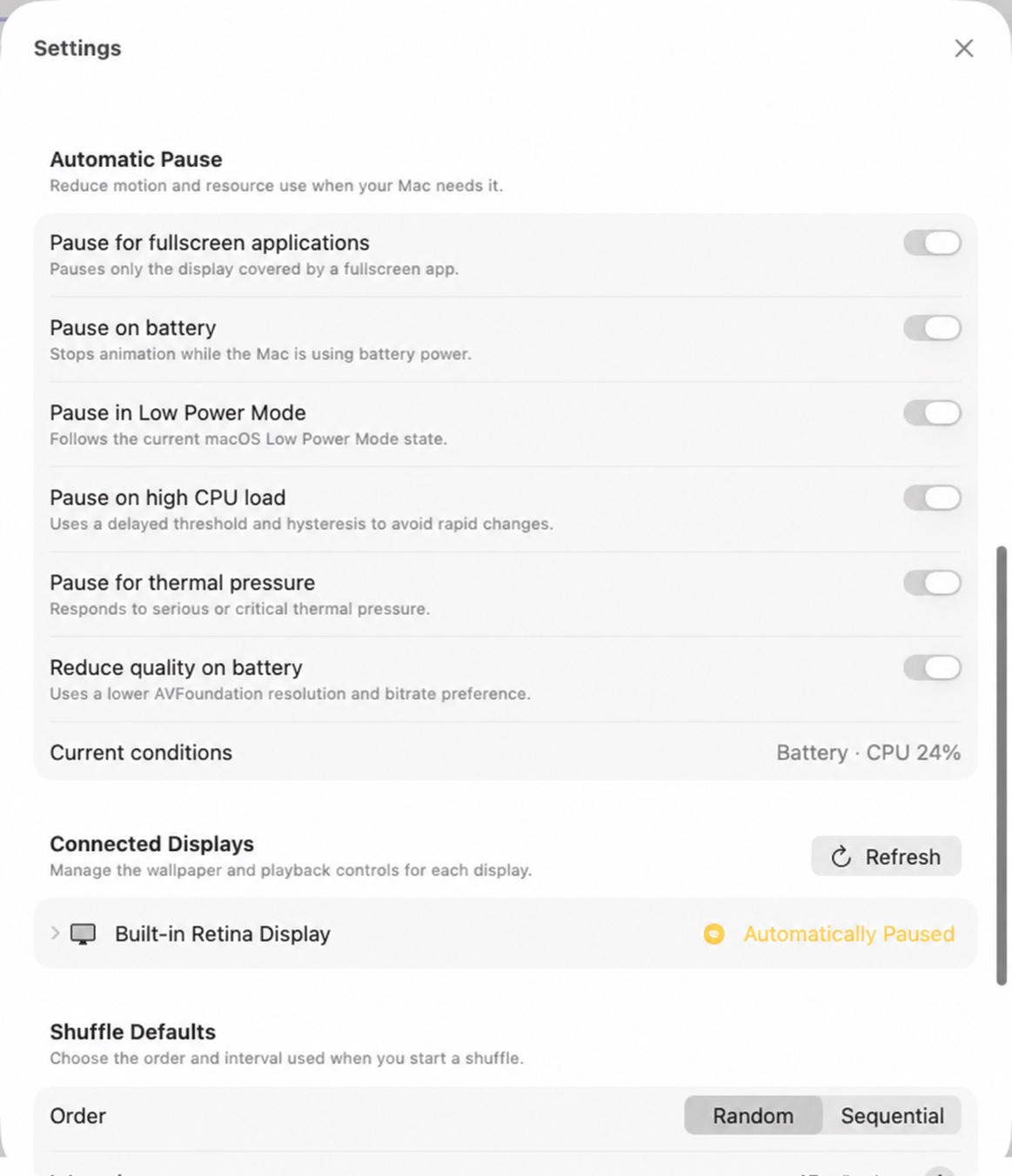
VibePapers renders local videos directly and can respond to fullscreen work, battery state, processor load, and thermal pressure.
The controls behind “resource aware.”
These are the real automatic pause, connected-display, and shuffle controls in the current app.
A direct path from video to desktop.
1Inspect the media
toValidate the selected file, read its characteristics, and prepare a poster frame.
2Assign a display
toPersist the video, framing, speed, pause state, and shuffle behavior for that screen.
3Render and adapt
Play through a desktop-level AVFoundation surface and respond to enabled resource policies.
Built for macOS 26.
Actual processor, graphics, memory, and disk use depend on the number, resolution, codec, frame rate, and size of the videos you choose.
- Operating system
- macOS 26 or later
- Architecture
- Apple Silicon and Intel
- Personal video containers
- MOV, MP4, and M4V
- Account required
- No
- Telemetry
- None
- Battery behavior
- Optional pause and quality reduction
- Desktop engine
- VibePapers must remain running
Keep motion under control.
Give every display its own video, then let VibePapers respond to the way you use your Mac.